Beyond Prompt and Pray: A Field Guide to Structured AI Engineering
Companion to: The State of AI in Software Engineering: A CTO Briefing
The Wall
The first few hundred lines are magic. You describe a feature, an agent scaffolds it, tests appear, the code compiles and runs. You ship something real in an afternoon. You wonder why anyone still writes code by hand.
Then your requirements start layering on each other. Architectural decisions accumulate. The agent forgets what you told it three prompts ago — a business rule, a naming convention, an API pattern you settled on last week. You find yourself pasting the same context into every new session. You create a markdown file of reminders. You start yelling at it in the prompt to stop doing the thing it keeps doing. More of your time goes to rework — fixing code the agent wrote confidently and incorrectly — and less goes to building. At some point you realize you're spending more tokens managing the session than doing productive work.
That's the ceiling. Almost everyone hits it. The application gets to a certain size or complexity and the gains plateau or reverse. You're still faster than writing everything by hand, but the gap is narrowing and the frustration is growing. Steve Yegge puts it plainly: "Everybody's like, 'I tried it. I spent two hours with it and all it produced was garbage.'"1 Dex Horthy calls it the "naive approach" — vibing your way through a problem until you run out of context, give up, or the agent starts apologizing.2
I spent over a year pushing through that wall — mid-2024 through the early agentic tools, building real applications, watching my velocity collapse past a certain codebase size every time. The proportion of time spent reminding and reworking kept growing. Then the tooling shifted: unfettered terminal access, sub-agents that could fork fresh context windows, persistent memory systems, frameworks that packaged these patterns into reusable workflows. Practitioners like Horthy at HumanLayer were designing entire processes around managing the context window as a scarce resource.2
The ceiling disappeared. Where the old approach got slower as the codebase grew, the new one got faster. I took these workflows to a client's enterprise application — eight engineers, 18 months of accumulated tech debt — and replatformed their database architecture in a morning. Over the next several weeks I delivered roughly half a roadmap they'd projected six to eight months out. Enterprise SSO, cloud deployment, AI features, governance — not a toy exercise.
Yegge says you need 2,000 hours with AI before you can predict what it's going to do — before trust becomes possible.1 I think he's right. The skill isn't prompting. It's building an intuition for how to structure context, where to insert your judgment, and when to let the system run. That intuition only comes from doing the work. What follows is the workflow I've converged on — what the accompanying briefing calls structured AI engineering. I can point you to the frameworks and the practitioners I've learned from. But I'd be dishonest if I didn't say upfront: reading this will give you a head start, not a shortcut. You're going to have to put in the hours.
Why It Breaks
You already know what the wall feels like. Now here's why it exists.
Every turn in an AI coding agent is a stateless function call.2 Context window in, next step out. No memory of yesterday's session. No awareness of the decision you made last week or the bug you fixed this morning. The contents of that context window are the only lever you have to affect the quality of the output. If you've seen Memento,3 you already get it — total amnesia, every morning. The main character survives only because of the system he built to re-establish everything he already knew. Every AI session works the same way.
Think of the context window as a scuba diver's air tank. System prompt, tool definitions, memory files — that comes off the top before you even start. Reading the code, searching for files, understanding the prompt — that's still the descent. By the time you're at depth and ready to build, a big chunk of your air is already gone. What's left gets eaten by follow-ups, corrections, and conversation turns. Response quality degrades around 60-70% utilization — practitioners call it context rot.2 Architecture, business rules, coding standards, months of decisions — one tank was never going to be enough.
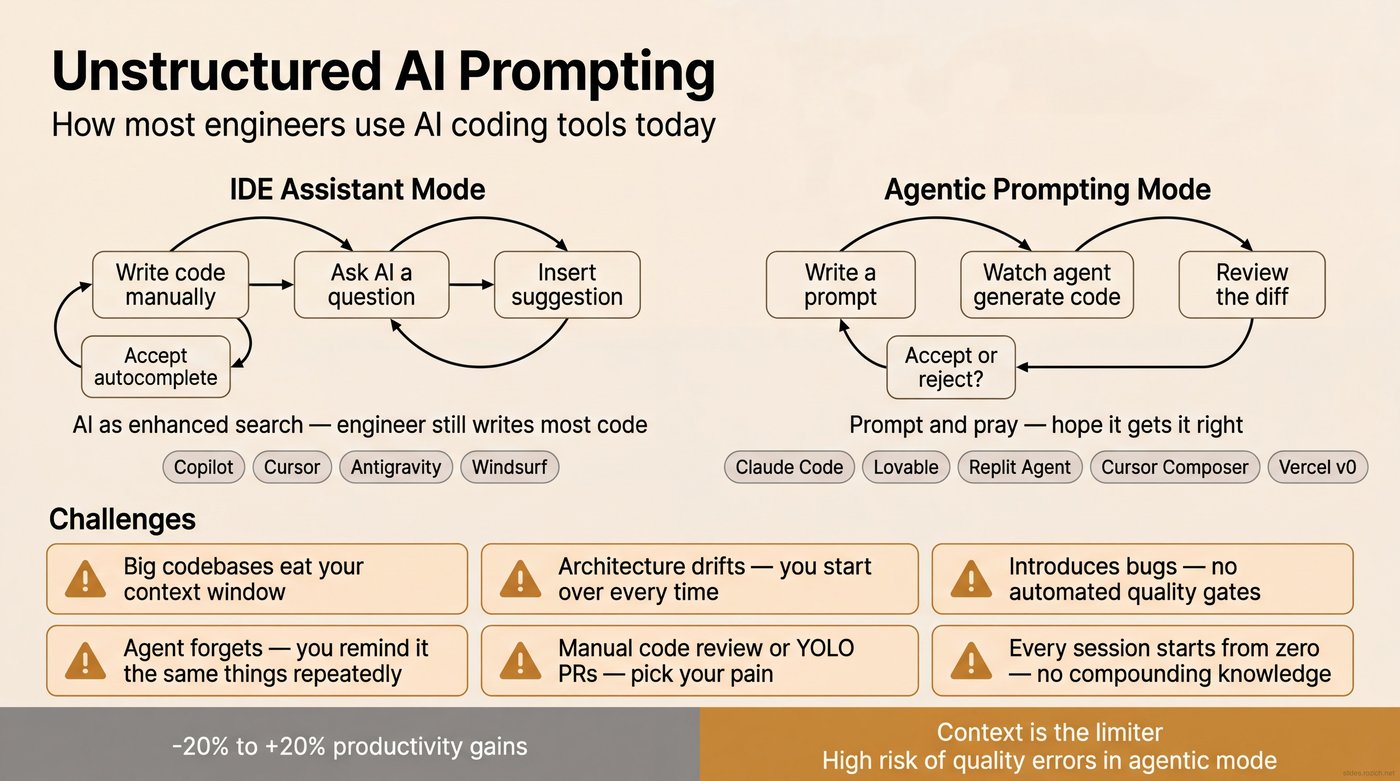
This is why experienced engineers try AI coding tools and come back unimpressed — or genuinely slower. It's not that AI is bad at writing code. It's good at writing code. But code generation without context produces output that takes more effort to fix than it saved to generate. You end up debugging AI-generated code you don't fully understand, in a codebase the AI doesn't fully understand either. At that point, you're slower than just writing it yourself.
Yegge and Gene Kim call this the "head chef" problem — you're the architect, AI is an enthusiastic but unreliable sous chef.1 A year ago, the best advice was to treat it like a junior developer: hand-craft every instruction, specify exact file paths, reference existing patterns by name, review every line. It worked — but it made you the bottleneck. You were doing the agent's research for it, carrying the full context of the codebase in your head so you could spoon-feed it one prompt at a time.
What Makes It Possible
Over the past year, a set of capabilities came together that let you engineer around all of this. No single one is the answer — but combined, they're what makes it possible to stop micromanaging agents and start working like an architect.
Persistent memory. The amnesia problem is only fatal if there's no system for remembering. A persistent knowledge base — every architectural decision, every pattern, every prior mistake — makes session 100 as informed as sessions 1 through 99 combined. What works best is file-system-based memory with agentic search: structured files an agent can search at the start of any session. Not a vector database, not a SaaS product. The knowledge base grows with every task. The system gets smarter over time instead of starting from zero every morning.
Tools and agency. An agent that can only generate text is an autocomplete engine. An agent with tools — bash access, file operations, git history, API calls, web search — can actually do the work. Claude Code broke through by giving agents a terminal instead of a chat window. Give an agent your terminal and it can do anything you can: run tests, inspect diffs, search codebases, verify its own output. Specialized integrations let agents interact with your entire development ecosystem — project management, GitHub, documentation — not just the files in front of them.
Sub-agents and horizontal context. This is the one that changes the math. Instead of cramming everything into one context window and watching it degrade, you fork. A coordinator agent breaks a problem into pieces and hands each piece to a sub-agent with its own fresh context window. Five agents, each with 200K tokens of focused capacity, produce far better results than one agent choking on a million tokens of noise. This is horizontal scaling for context — the same principle that made distributed systems more powerful than bigger mainframes. A coordinator fans out to six focused agents; each uses its full context on a single question and returns a clean finding. The coordinator compacts the results and passes them to the next phase. No single agent has to hold everything. Dex Horthy's entire workflow is built on this — "frequent intentional compaction" is map-reduce for context windows.2
Encoded workflows and reusable skills. When the research-plan-implement-validate cycle works, the natural next step is to package it. A /research command that pulls a ticket, fans out sub-agents, and returns a compacted report. A /create-plan command that takes the research and produces an implementation spec. These are reusable skills — prompts and orchestration logic that encode how things are supposed to happen, not just what the codebase looks like. You develop them once and use them across projects. The workflow becomes productized: repeatable, shareable, improvable. You stop hand-crafting every interaction and start running a process.
Automation and guardrails. Agents are probabilistic. They'll skip tests, forget conventions, introduce subtle regressions. Automation takes the randomness out of the parts that should be deterministic. Hooks — if-this-then-that triggers that fire before or after specific actions — ensure that linters run before every commit, tests execute before every PR, the knowledge base syncs after every session. These aren't optional niceties. They're the rails that keep the process honest when you're moving at AI speed, because at AI speed you cannot catch mistakes at the end.
Some of these existed a year ago. Others are brand new. What changed is that they matured enough to work together — and a community of practitioners figured out how to combine them. Yegge describes the progression as going from "power saw" to "factory farm."1 Individual tools are dangerous and powerful. A system that orchestrates them is a different thing entirely. The same way compilers freed engineers from registers and memory allocation, these building blocks free you from token budgets and prompt specificity. You work at the level of requirements, architecture, and review. The system handles the rest.
The Structured Workflow
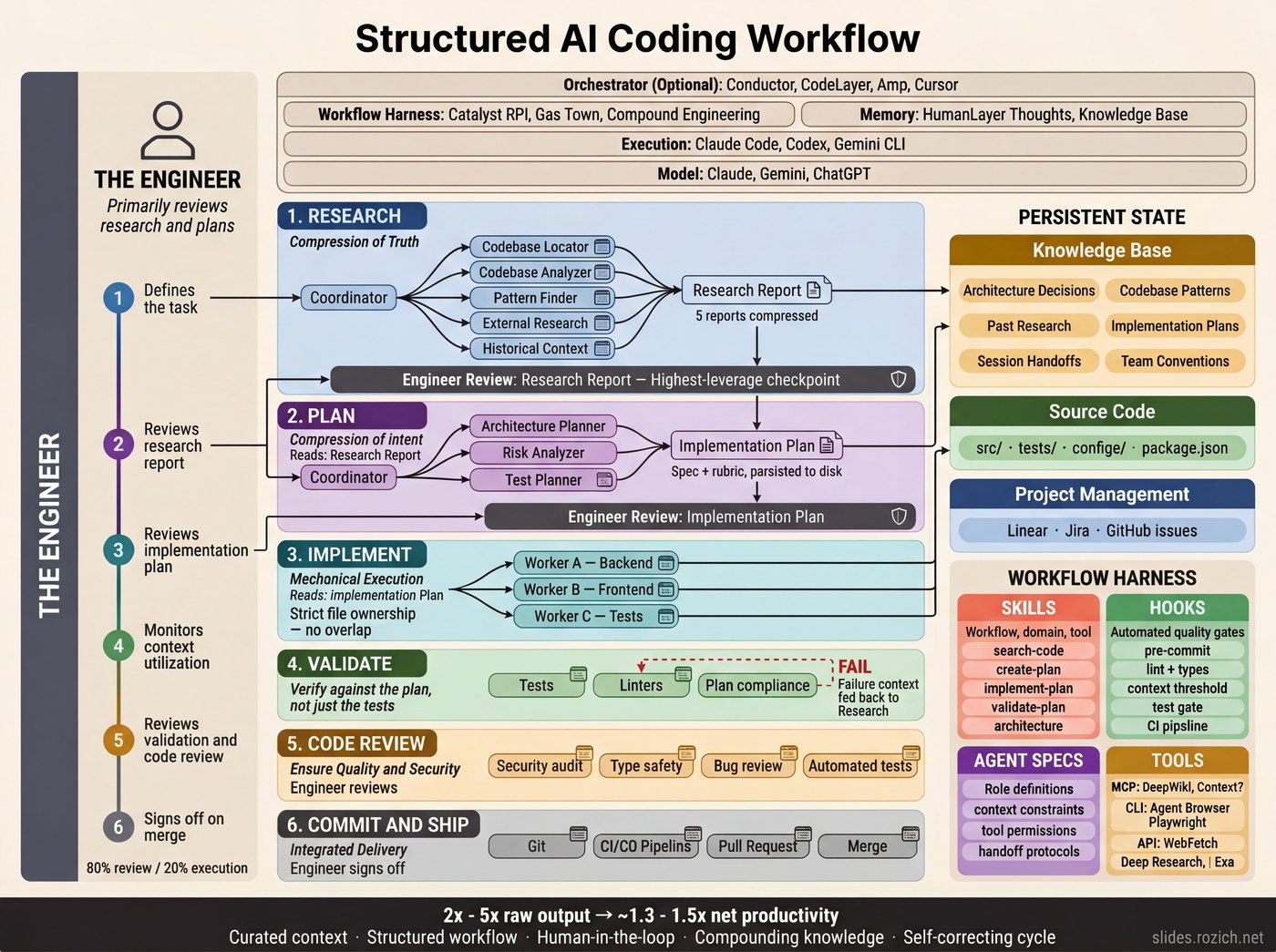
The mental model shifts from "I write code and AI helps" to "I design systems and AI executes."4 AI engineers invert the time allocation — roughly 80% on research and planning, 20% on execution. A bad line of research produces a bad plan. A bad plan produces hundreds of bad lines of code.2 The highest-leverage place to invest your attention is the earliest phase, not the code itself.
What follows is one implementation — packaged as an open-source Claude Code plugin called Catalyst.5 Other structured approaches (Gas Town, HumanLayer, Compound Engineering) use different phases and tooling. What they share is the underlying discipline: structuring how you coordinate context windows, agents, tools, and knowledge across sessions.
Two concepts drive the mechanics: intentional compaction and intentional clearing. Compaction means distilling findings into a structured document that carries only the relevant context forward. Clearing means starting a fresh session and giving it only the previous step's output. Each handoff is deliberate: compress, clear, start fresh.
Define the Task
Before anything else, a human writes the spec. This is the step most people skip — they open an agent session and start prompting from a vague idea. But everything downstream is bounded by the quality of the input. A well-defined spec doesn't have to be long. It needs to be specific enough that an engineer — or an agent — could read it and know what "done" looks like. Sean Grove at OpenAI calls this "spec-driven development" — the spec is the real source code, and the generated code is the compiled output.6
The spec becomes the input to the research phase — the ticket an agent pulls, reads, and uses to orient its search. Linear, Jira, a GitHub issue, a markdown file — the tool doesn't matter. What matters is that the spec exists as a durable artifact before you start spending tokens. I use agents to help draft acceptance criteria and pressure-test edge cases, but the human decides what gets built and signs off that the spec is ready for work.
Research
Now agents gather context — not by dumping everything into one long prompt, but by deploying sub-agents, each with its own fresh context window focused on a single question. A coordinator fans out to several: one pulls the ticket and its acceptance criteria, one searches the knowledge base for prior decisions about this part of the system, one analyzes the codebase for relevant patterns and entry points.
The research step's only job is to compact all of the relevant context into a research document — not to suggest a solution. Dex Horthy calls this "frequent intentional compaction": designing your entire workflow around context management.2
The engineer's review of this research report is the highest-leverage moment in the entire process. If the research is incomplete or contains errors, everything downstream inherits those problems. Ten minutes of careful reading here saves days of rework.
Planning
Intentional clearing: new session, fresh context. The planning agent picks up the compacted research document — that's all it gets — and follows the same orchestrator-worker pattern as research. It breaks the planning work into pieces: one sub-agent dives into the database layer, another maps the API surface, another analyzes the test strategy. Each works in a fresh context window with full focus. The orchestrator gathers the individual plans, gives feedback to each sub-agent, and produces a final implementation spec: what to change, in what order, with what constraints, informed by the architecture decisions already stored in the knowledge base. The plan becomes both the blueprint the agent implements against and the rubric that validation checks against later.
This is where your judgment matters most. A good implementation plan should be readable enough that you could hand it to a mid-level engineer and they could write the code from it. That's the bar. If you're not reading the plan carefully and pushing back where it's wrong, the whole workflow falls apart. You have to actually engage with the work — this isn't something you can set and forget.
Implementation and Validation
Fresh session again. The implementation agent picks up the approved plan plus relevant architecture docs and coding conventions from the persistent knowledge base. It's working from curated context, not flying blind.
Validation checks the output against the plan, runs tests, and verifies constraints. If validation fails, the specific failure gets fed back to research — the cycle repeats on the failure, not the whole task. If it passes, the learnings get persisted: new patterns discovered, decisions made, constraints encountered. The 100th task is dramatically easier than the 1st — the system has accumulated real context about your codebase, your conventions, and the decisions you've made along the way.
Handoffs
The four steps run linearly, but real work isn't always linear. You'll iterate within a step — revising research after spotting a gap, reworking a plan after feedback, debugging an implementation that didn't land. That's where intentional handoffs come in.
In a 200K-token context window, quality degrades noticeably around 120-130K tokens. Auto-compaction helps in a pinch, but it's lossy — the model decides what to keep. Intentional compaction is better: you tell the system what to carry forward.
/create-handoff "The streaming CSV writer works for small files but fails on datasets over 50K rows. Focus next session on the chunked write approach — see the pattern in lib/export/chunked-writer.ts."
The handoff skill compacts the full session into a structured document — what was accomplished, what's still open, references to relevant files — and saves it to persistent memory. Your directional note gets included, so the next session knows not just where you left off but what to focus on. Nothing gets lost between sessions.
What This Looks Like in Practice
Your ticket in Linear: PRJ-42, "Add bulk CSV export to the analytics dashboard."
Research. You type one command:
/research PRJ-42
The research skill pulls the ticket, spins up 4-6 sub-agents — one searches the knowledge base for prior decisions, one scans the codebase for existing export patterns, one checks library docs, one looks for how similar features were built. A few minutes later, you get a compacted research document.
You read it. The knowledge base had a decision from two months ago to use streaming responses for large exports. The codebase scan found an existing CSV utility in lib/export/ that handles header generation. The ticket mentions a 100K row limit. You add a note: "The existing CSV utility doesn't handle streaming — we'll need to extend it or replace it." That five-minute read just saved you from building something that wouldn't scale.
Planning. Fresh session:
/create-plan
The planning agent receives only your annotated research document. No noise from the research phase. It goes deeper — sub-agents do a targeted dive into the streaming pattern used elsewhere in the codebase and analyze the existing CSV utility. It produces a plan: extend the CSV utility with a streaming writer, add a new endpoint following the pattern in api/reports/, wire it to the dashboard using the existing export dropdown. Seven files to touch, in order, with the specific changes for each.
You read the plan. The streaming approach matches the prior decision. You catch one thing: bulk exports should require an additional permission check beyond the dashboard's default auth. You add that constraint. The plan gets revised.
Implementation. Fresh session:
/implement-plan
The agent receives the finalized plan plus architecture docs from the knowledge base. It implements. You review the diff against the plan.
Validation. Tests run. The export works for small datasets. A load test confirms streaming handles 100K rows without memory issues. The permission check is verified. The new pattern gets documented in the knowledge base for next time.
Total time: a few hours. Without the workflow, this is a multi-day ticket — researching the codebase, figuring out the streaming pattern, discovering the existing utility (or not discovering it and building a duplicate), hitting the permission issue in code review. The workflow front-loaded all of that into a research doc you read in five minutes.
The Boundary Podcast's "AI That Works" series walks through workflows like this in real time — practitioners coding live with structured approaches.7
The Framework Landscape
The workflow above runs on Catalyst, an open-source framework I built.5 Several others encode the same principles: GStack, Garry Tan's Claude Code toolkit, hit 34K+ GitHub stars within days of release.8 Every's Compound Engineering encodes an 80/20 planning-to-execution framework for single-engineer teams.9 HumanLayer builds on Dex Horthy's context engineering principles.2 For parallel multi-agent orchestration, see Gas Town,10 Devin, and OpenHands.
Pick one, learn it well, and adapt it to your codebase. After a hundred hours or so, you'll be digging into the source, forking it, adjusting the workflow to how your brain works. That's when it clicks. The tooling is early. The principles are stable. The investment compounds regardless of which framework carries it.
The Trade-Offs
The structured workflow solves the consistency problem. It doesn't solve everything.
Rework Is the Tax, Not the Problem
I spend roughly 15-20% of my time on rework — refactoring, rewriting, redesigning things that didn't land right the first time. That proportion has stayed stable as the codebase has grown. With the naive approach, the rework percentage grows over time — more bugs creep in, more debt accumulates, more sessions get spent reprompting and reminding. The structured approach keeps it flat. That's the difference.
But don't obsess over rework as a metric. It's a double-edged sword. If you're writing code ten times faster, you should be ten times more willing to throw it away. When I can try one database architecture in a morning, see how it feels, and try a different one the next day, two of those three attempts are "rework" by the numbers — but I just ran an experiment in two days that used to take a quarter of planning and analysis. The throwaway code wasn't waste. It was the cheapest way to find the right answer. Tight feedback loops are the cost of the velocity: tests, linters, quick runs, incremental commits. You can't catch mistakes at the end anymore. You catch them continuously.
The Cognitive Cost
AI eliminates the easy work — boilerplate, routine fixes, autopilot tasks — and leaves you doing nothing but deep thinking all day. Architecture calls. Judgment that can't be delegated. Constant evaluation of agent output. Yegge calls it the "AI Vampire" — it drains your cognitive energy even as your output skyrockets.4
But it's worse than just "more hard work." The routine tasks AI replaced weren't dead weight — they were cognitive recovery time. Engineers have always naturally alternated between deep problem-solving and lighter work: writing a straightforward test, updating documentation, reviewing a simple PR. That rhythm let you sustain an eight-hour day. When AI handles all the routine work, what's left is an unbroken stream of the hardest thinking you do. Every hour is redline.
Your best hours with this workflow are three or four intensely productive ones. Not eight. But those three or four hours produce more than a full week used to. The output is massive — and the exhaustion is real. Plan your day around intensity, not duration. If you're feeling burned out at 2pm, that's not a failure of discipline. You've probably already done more deep work than most engineers do in a week. The engineers who try to push through and sustain eight hours end up producing lower-quality output in the back half — which creates rework that eats into the next day.
This has practical implications for how organizations should think about rolling this out. You can't mandate that 20 engineers start doing this on Monday and expect sustained performance. The cognitive adjustment is real, the learning curve is steep, and the natural recovery rhythms that made eight-hour days sustainable disappear. Phased adoption isn't just prudent — it's necessary.
The Team Problem
This is the one I didn't see coming — and the one where the industry is still figuring it out.
When I tried to bring on additional developers, friction emerged immediately. I was a single developer in a mono repo, and the workflow I'd built was deeply personal. Engineers who saw AI as augmentation rather than something to build process around struggled. Code review became a pain point: does a 5,000-line PR need line-by-line review, or can it be architectural — correctness, test coverage, business logic — against a plan you already approved? The industry hasn't answered this yet. Merge conflicts are another big one. Multiple agents working broad scope in overlapping parts of the codebase produces conflicts that are genuinely painful to untangle.
Underneath the tactical friction is a deeper question: does AI adapt to our existing way of working, or does our way of working adapt to AI? The early evidence suggests the latter — AI-augmented pods owning bounded services, architectural review instead of line-by-line review, parallel delivery instead of sequential sprints. But these are organizational changes, not just tooling decisions.
Here's what I think the path looks like: you don't try to transform the whole team at once. You start with one or two engineers on a real project. They go through the learning curve, build the intuition, and develop the workflow for your specific codebase and constraints. Then those engineers become the foundation — not because they're more productive individually (though they are), but because they can show the next cohort what the transition actually looks like. They've been through the resistance, the frustration, the identity shift. They can coach from experience, not theory.
The engineers who make this transition become more valuable than their output alone. They understand the failure modes. They know which parts of the workflow need adaptation for your codebase. They can articulate what changed in a way that no outside training or documentation can. This is how adoption actually scales — not through mandates or workshops, but through demonstrated credibility from people who did the work on the same codebase everyone else touches.
Expect course corrections. Recognize that friction is a process mismatch, not a personality conflict — that's the first step toward figuring it out.
Getting Started
None of the trade-offs above stopped me from shipping. They're real, and they're ongoing — but the leverage is worth it. If you want to find out for yourself, here's the shortest path in.
Get set up. Claude Code with a Max plan. A structured workflow framework — GStack, Catalyst, or Compound Engineering. Wire up your project management system so the research step can pull ticket context automatically.
Ship one feature end-to-end. Grab a real ticket — not a toy project. Run the full cycle: spec → research → plan → implement → validate. Compare how long it would have taken without the workflow.
Then keep going. Your first run will be the longest. Over the next week or two, the cycle time will compress as the workflow becomes natural and the knowledge base starts working for you. Then start parallelizing — two or three agents working on different parts of the same feature simultaneously. That's when it starts to feel less like a process and more like a superpower.
And then bring someone with you. Once you've internalized the workflow and built confidence on real work, the most impactful thing you can do is help another engineer through the same transition. The industry doesn't need more blog posts about AI productivity. It needs engineers who've made the shift showing other engineers how — on real codebases, with real constraints, in the context of real teams. That's how this scales.
Footnotes
Footnotes
-
Steve Yegge, Latent Space podcast (December 2025) and Vibe Coding (with Gene Kim, IT Revolution Press, 2026). The "everybody tried it and produced garbage" quote is from the podcast; the "head chef" framing — developers as architects, AI as sous chefs that need explicit instructions — is from the book. Podcast: https://share.snipd.com/episode/c73f7009-d7b9-40a4-964a-bb41251b50f6 ↩ ↩2 ↩3 ↩4
-
Dex Horthy, HumanLayer. "Advanced Context Engineering for Coding Agents," August 2025. "Frequent intentional compaction" — designing workflows around context management. "You have to engage with your task when you're doing this or it will not work." https://www.humanlayer.dev/blog/advanced-context-engineering ↩ ↩2 ↩3 ↩4 ↩5 ↩6 ↩7 ↩8
-
Memento (2000), directed by Christopher Nolan. IMDb: https://www.imdb.com/title/tt0209144/ ↩
-
Steve Yegge, "The 8 levels of AI coding adoption" and "The AI Vampire," 2026. 8-level adoption ladder, vampiric burnout effect. Pragmatic Engineer podcast: https://newsletter.pragmaticengineer.com/p/steve-yegge-on-ai-agents-and-the; AI Vampire blog post: https://steve-yegge.medium.com/the-ai-vampire-eda6e4f07163 ↩ ↩2
-
Catalyst — open-source Claude Code plugin system for structured AI engineering workflows. This author built Catalyst. https://catalyst.coalescelabs.ai/ ↩ ↩2
-
Sean Grove (OpenAI), "The New Code," AI Engineer World's Fair, 2025. "Chatting with an AI agent for two hours, specifying what you want, and then throwing away all the prompts while committing only the final code… is like a Java developer compiling a JAR and checking in the compiled binary while throwing away the source." https://www.youtube.com/watch?v=8rABwKRsec4. See also: Maxi Ferreira, "The Rise of Spec-Driven Development," Frontend at Scale, Issue 49. https://frontendatscale.com/issues/49/ ↩
-
Boundary Podcast, "AI That Works" series. Practitioners walking through structured AI engineering workflows in real time. ↩
-
GStack — Garry Tan's Claude Code workflow toolkit. 15 opinionated skills, sprint-like workflow (Think, Plan, Build, Review, Test, Ship, Reflect). 34K+ GitHub stars. https://github.com/garrytan/gstack ↩
-
Dan Shipper and Kieran Klaassen, Every. Compound Engineering plugin for Claude Code — 80% planning and review, 20% execution. Single-engineer teams running five products. https://github.com/every-ai/compound-engineering ↩
-
Gas Town — Yegge's multi-agent orchestration system for Claude Code. Coordinates 20-30+ agents with persistent identities, git-backed work tracking, inter-agent mailboxes, and merge queues. https://github.com/steveyegge/gastown ↩